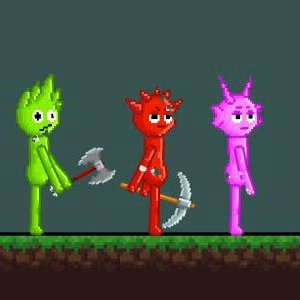
Sprunki Sandbox

 Dino Simulator
 Orbit Kick
 Sandbox Universe
 Stickman Swing
 Daily Crossword Puzzle
 The Impossible Quiz 2
 Trees Hate You
 The Freak Circus
 Mr. Racer – Car Racing
 Geometry Dash Wave 3D
 Space Waves 3D
 Poppy Playtime
 Extreme Pamplona
 Slope Game
 Her Trees
 REPO
 Wacky Steps
 jollibees
 Space Waves
 Parking Fury 2
 Awesome Tanks
 Flying Cars Era
 Escape Road Halloween
 99 Nights in the Forest 101 original
 Moto X3M: Spooky Land
 Crazy Flips 3D
 Dunk Hoop
 Squid Game
 Jet Boat Racing
 Vex 3
 Subway Surfers
 Gunspin
 Basketball Stars
 Bubble Shooter Classic
 Slap Champions
 Obby on a Bike
 Wacky Flip
 Dead Shot
 Plants vs Brainrots Online
 Basket Random
 Meeland.io
 Geometry Dash Breeze 3D
 Tap Drift
 Geometry Dash Lite
 Cubes 2048
 Dreadhead Parkour
 Fireboy and Watergirl 6: Fairy Tales
 Tiny Arena
 Alone on Island
 Candy Crush
 Car Racer
 Stick Soccer 3D
 Granny
 Tiny Fishing
 Ragdoll Hit
 Grand Cyber City
 Monster Truck Extreme Racing
 Slope Rider
 Drift Boss
 Bus Stop Jam
 Happy Glass
 Learn To Fly 3
 Domino Block
 Ball Blaster
 Helix Jumping
 Sports Heads Tennis
 Snow Rider 3D
 Geometry Vibes
 Fantasy Helix
 BloodMoney
 Friday Night Funkin’ Character Test Playground
 Long Board Crasher
 Cowboy Safari
 Moto Road Rash 3D 2
 Duck Duck Clicker
 Ragdoll Archers
 Pizza Ready
 Among Us Online
 Level Devil
 Marble Run 3D
 Golden Duel Fast Draw
 Monkey Mart
 Dino Survival: 3D Simulator
 Tunnel Rush
 Galaxy Shooter
 Deer Adventure
 Hide and Seek
 Dunk Dash
 Murder Mafia
 Red Ball 4
 Uno Online
 Drift Hunters
 Merge Alphabets Lore 3D
 Red Ball 4: Volume 2
 Smash Karts
 BloodMoney 2
 Minecraft Classic
 Golf Hit
 Basketball Random
 Five Nights At Freddys
 Farm Merge Valley
 Avatar Game
 Mad Racers
 Blocky Rider
 Solar Smash
 Zuma Deluxe
 Traffic Jam 3D
 Moto X3M
 Wrestle Bros
 Cookie Clicker City
 Fireboy and Watergirl
 Shell Shocker
How to play Sprunki Sandbox?
PC Controls
Left Mouse Button: Select, place, and interact with objects.
Right Mouse Button: Move the camera or perform alternative interactions, depending on the selected tool.
Mouse Wheel: Zoom in or out of the scene.
Keyboard: Use additional shortcuts depending on the selected tool.
Mobile Controls
Tap: Select and place objects.
Drag: Move objects around the scene.
Pinch: Zoom in or out.
On-Screen Controls: Access available sandbox tools.
The Main Objectives of Sprunki Sandbox
Unlike traditional action games, Sprunki Sandbox gives you the freedom to decide what you want to do. There is no single way to approach every session. You can focus on destruction, stage intense battles, design interesting environments, or simply experiment with the game's physics.
Create Destruction with Physics
One of the most entertaining activities in Sprunki Sandbox is watching objects react to physical forces. You can smash structures, launch objects, and create scenes filled with unexpected movement. The physics-based interactions make every experiment an opportunity to discover something new.
Try placing different objects together and observing what happens when they collide. You might build a tall structure and see how it falls apart, or arrange several objects to create a chain reaction. Small changes to the setup can produce surprisingly different results.
Destruction is not just about making a mess. It can also help you understand how objects interact and inspire new ideas for your next creation. If a setup does not work as expected, adjust the arrangement and try again.
Stage Exciting Battles
Combat is another important part of Sprunki Sandbox. You can place characters in the environment, equip them with weapons, and create your own battles. Rather than following a fixed combat sequence, you have the freedom to decide where fighters stand and what equipment they use.
Try arranging characters on opposite sides of an arena and giving each group different weapons. You can also build walls or other obstacles to change how the battle unfolds. A simple open space creates a different experience from a narrow arena with several barriers.
Experimenting with different combinations keeps the action interesting. You might prefer close-range fights, long-distance attacks, or chaotic battles involving multiple characters. The sandbox format allows you to explore these possibilities at your own pace.
Build Structures, Traps, and Scenarios
Construction is just as important as destruction in Sprunki Sandbox. You can use the available objects to create walls, platforms, obstacle courses, and custom battle arenas. These structures give your characters a place to interact and provide new ways to experiment with physics.
For example, build a narrow passage that forces characters to move through a limited space. Add barriers to create cover or arrange obstacles to make movement more difficult. You can also design a scene around a particular idea, such as a small arena, a defensive base, or a complicated trap.
Start with a simple structure before adding more objects. This makes it easier to understand how each element affects the scene. Once the basic design works, expand it with extra obstacles, characters, and interactive items.
Experiment with Different Weapons
Sprunki Sandbox offers a varied arsenal that can include swords, guns, rocket launchers, and lasers. Each weapon type provides a different way to approach combat and destruction. Melee weapons are suited to close encounters, while ranged weapons allow characters to attack from farther away.
Explosives add another layer of chaos. Placing them in a carefully designed environment can produce dramatic physical reactions and send ragdoll characters flying. You can experiment with different placements to see how the surrounding objects respond.
Rather than using the same equipment in every scenario, try changing the weapons to suit your idea. A close-combat arena may work well with swords, while a large battlefield gives ranged weapons more room to make an impact.
Customize Your Battle with Your Skills
A major attraction of Sprunki Sandbox is the ability to personalize almost every part of your scene. You can choose characters, adjust their appearance, select weapons, add explosives, and build an environment that matches your imagination.
Choose Your Favorite Sprunki Characters
Characters are at the center of many sandbox experiments. You can choose from available Sprunki characters and place them throughout your scene. Their positions and equipment help determine how a battle or other scenario develops.
For a simple experiment, start with two characters and place them on opposite sides of an open area. Observe their interactions, then change their positions or add more objects to see how the situation changes.
You can also use multiple characters to create a larger battle. Arrange them in groups, place them around obstacles, or give different fighters different roles. The goal is to make the scene interesting to watch and enjoyable to experiment with.
Change Outfits and Visual Styles
Customization is not limited to combat equipment. Different outfits can give your fighters a fresh appearance and help distinguish characters from one another. This is useful when creating scenes with multiple groups or designing a themed battlefield.
For example, you might use different looks to identify opposing teams or create a particular atmosphere for your scene. Even small visual changes can make a custom setup feel more personal.
Explore the available customization options and choose styles that match your ideas. If you are creating a story-like scene, character appearances can help make each group easier to recognize.
Equip Fighters with Different Weapons
Choosing the right arsenal is an important part of building an entertaining battle. Sprunki Sandbox allows you to experiment with different types of equipment, from close-range weapons to powerful guns.
Melee weapons are useful for scenarios focused on direct encounters. Ranged weapons can create more dynamic battles across a larger space, while heavier weapons and explosives add dramatic effects. You can also give different characters different equipment to make the action more varied.
Try changing only one weapon at a time when testing a new setup. This helps you see how the equipment affects the scene. After you understand the differences, combine several weapon types to create a more complex battlefield.
Add Explosives for More Chaos
Explosives can transform an ordinary scene into a spectacular physics experiment. Place them near structures or arrange them around a group of objects, then observe how the explosion affects the surrounding environment.
You can use explosives to test how different objects react to sudden force or create a dramatic ending for a custom battle. For instance, build a structure with several objects and see how its arrangement changes after an explosion.
Remember that placement matters. Moving an explosive closer to or farther from an object can change the outcome. Experiment with different arrangements to discover interesting results instead of repeating the same setup.
Design Your Own Environment
The environment gives your creations structure and purpose. Use walls, trees, platforms, and other available landscape objects to design a setting that supports your ideas. You might create an open arena, a maze, a defensive base, or a challenging obstacle course.
Think about how the layout affects movement and interaction. Wide spaces allow characters and objects to spread out, while narrow passages create tighter encounters. Barriers can provide cover, and elevated platforms can add variety to the scene.
You do not need to build a complicated environment immediately. Start with a few basic objects, test how they work together, and gradually add more detail. This approach makes it easier to create a balanced scene without becoming overwhelmed by too many elements.