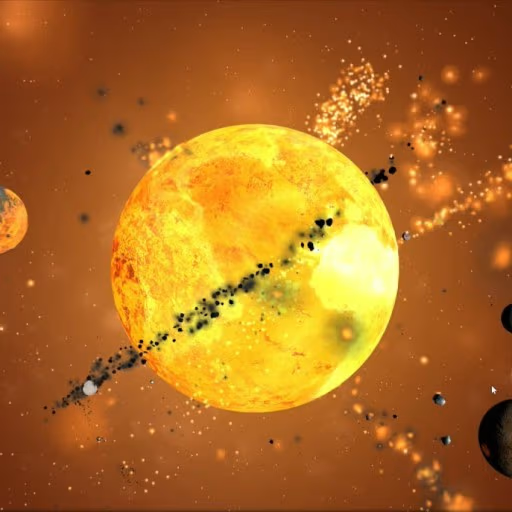
Sandbox Universe

 Stickman Swing
 Daily Crossword Puzzle
 The Impossible Quiz 2
 Bunny Farm
 Cart Ride Danger Mount
 Sharkosaurus Rampage
 Trees Hate You
 The Freak Circus
 Mr. Racer – Car Racing
 Geometry Dash Wave 3D
 Space Waves 3D
 Poppy Playtime
 Extreme Pamplona
 Slope Game
 Her Trees
 REPO
 Wacky Steps
 jollibees
 Space Waves
 Parking Fury 2
 Awesome Tanks
 Flying Cars Era
 Escape Road Halloween
 99 Nights in the Forest 101 original
 Moto X3M: Spooky Land
 Crazy Flips 3D
 Dunk Hoop
 Squid Game
 Jet Boat Racing
 Vex 3
 Subway Surfers
 Gunspin
 Basketball Stars
 Bubble Shooter Classic
 Slap Champions
 Obby on a Bike
 Wacky Flip
 Dead Shot
 Plants vs Brainrots Online
 Basket Random
 Meeland.io
 Geometry Dash Breeze 3D
 Tap Drift
 Geometry Dash Lite
 Cubes 2048
 Dreadhead Parkour
 Fireboy and Watergirl 6: Fairy Tales
 Tiny Arena
 Alone on Island
 Candy Crush
 Car Racer
 Stick Soccer 3D
 Granny
 Tiny Fishing
 Ragdoll Hit
 Grand Cyber City
 Monster Truck Extreme Racing
 Slope Rider
 Drift Boss
 Bus Stop Jam
 Happy Glass
 Learn To Fly 3
 Domino Block
 Ball Blaster
 Helix Jumping
 Sports Heads Tennis
 Snow Rider 3D
 Geometry Vibes
 Fantasy Helix
 BloodMoney
 Friday Night Funkin’ Character Test Playground
 Long Board Crasher
 Cowboy Safari
 Moto Road Rash 3D 2
 Duck Duck Clicker
 Pizza Ready
 Ragdoll Archers
 Among Us Online
 Level Devil
 Marble Run 3D
 Golden Duel Fast Draw
 Monkey Mart
 Dino Survival: 3D Simulator
 Tunnel Rush
 Galaxy Shooter
 Deer Adventure
 Hide and Seek
 Dunk Dash
 Murder Mafia
 Red Ball 4
 Uno Online
 Drift Hunters
 Merge Alphabets Lore 3D
 Red Ball 4: Volume 2
 Smash Karts
 BloodMoney 2
 Minecraft Classic
 Golf Hit
 Basketball Random
 Five Nights At Freddys
 Farm Merge Valley
 Avatar Game
 Mad Racers
 Blocky Rider
 Solar Smash
 Zuma Deluxe
 Traffic Jam 3D
 Wrestle Bros
 Moto X3M
 Cookie Clicker City
 Fireboy and Watergirl
 Shell Shocker
How to play Sandbox Universe?
- Mouse/Finger Drag: Rotate camera
- Scroll Wheel/Pinch: Zoom in/out
- "+" Button: Add object
- Tap Object: View/edit properties
- Time Controls: Speed up or slow down simulation
The Missions in Sandbox Universe
The main mission in Sandbox Universe is to create, destroy, and experiment. There are no strict objectives that force you to follow one particular path. Instead, the game gives you a collection of celestial objects and lets you decide what kind of universe you want to build.
Every object follows realistic gravity rules. Planets can orbit stars, moons can move around planets, and powerful objects can change the movement of everything nearby. Depending on their positions and physical properties, celestial bodies may collide, merge, or break apart.
Building Your Own Universe
A good starting point is the Solar System. You can explore its arrangement, observe how planets move around the Sun, and learn how different celestial bodies interact.
To begin building, open the object catalog using the "+" button. Select a star, planet, moon, or another object, then place it in the empty space. You can add several objects to create a complete planetary system or experiment with just a few bodies.
The camera controls make exploration more comfortable. Rotate the view to examine your system from different angles and zoom in to observe individual objects. You can also follow the movement of celestial bodies to understand their orbits more clearly.
As you become familiar with the mechanics, try creating systems that do not exist in our real universe. For example, you could build a system with multiple stars or place several planets close to one another. The possibilities depend on your imagination and how you arrange the objects.
Physics in Action
Physics is at the heart of Sandbox Universe. Gravity determines how celestial objects move and interact. Their mass, position, and distance from one another can influence the stability of an entire system.
You can tap any object to view its physical properties, including mass, radius, and temperature. Adjusting these parameters allows you to observe how small changes can produce significant effects.
For example, increasing the mass of a planet can change the movement of its moons. They may move into different orbits or spiral closer to the planet. Similarly, placing a black hole near Earth can dramatically affect the Solar System because of its powerful gravitational pull.
Collisions are another interesting part of the simulation. When celestial bodies meet, they may merge or scatter debris, depending on the conditions. You can speed up time to watch these events develop or slow everything down to examine the exact moment of impact.
These experiments make Sandbox Universe more than a simple space-building game. They provide an interactive way to explore how gravity shapes the universe.
Scenarios and Sandbox Mode
If you do not want to build everything from the beginning, the Scenarios section offers pre-built systems that you can explore. These setups include different arrangements, such as binary stars, asteroid belts, and complicated systems with multiple suns.
Each scenario provides a different starting point for experimentation. You can observe how the objects move, adjust their properties, or introduce new celestial bodies to change the system.
Alternatively, choose an empty sandbox and create everything yourself. Start with a single star, add planets, and gradually build a complete system. You can also experiment with unusual arrangements, crash planets together, create binary stars, or place objects near a black hole.
There are no fixed rules that limit your creativity. You decide whether to build a stable planetary system or create a chaotic environment filled with collisions and gravitational interactions.
Key Features of Sandbox Universe
Sandbox Universe combines realistic physics, flexible controls, and creative freedom. These features make it appealing to players who enjoy space exploration and simulation games.
Realistic Physics Simulation
The game uses gravity-based physics to control the movement of celestial objects. Planets orbit stars, moons interact with their planets, and massive objects can influence nearby bodies.
Collisions can also produce interesting results. Objects may merge or scatter debris, changing the structure of your system. These interactions make every experiment worth watching because even small changes can lead to unexpected outcomes.
A Full Catalog of Celestial Objects
Sandbox Universe provides a wide selection of objects for building different cosmic systems. You can choose from:
Stars: Create the center of a planetary system or experiment with multiple-star arrangements.
Planets: Add large or small worlds and observe their gravitational interactions.
Moons: Place natural satellites around planets and study their orbits.
Asteroids: Create asteroid belts or introduce smaller objects into existing systems.
Comets: Add moving celestial bodies to make your universe more varied.
Black Holes: Experiment with extremely powerful gravitational forces.
Neutron Stars: Introduce compact stellar objects into your cosmic experiments.
Each object can be adjusted, allowing you to create different conditions and observe their effects.
Flexible Time Controls
Time control is an important feature for exploring long-term changes. Speed up the simulation to watch orbital movements and system development over extended periods. Slow it down when you want to study a collision or a close encounter.
The ability to reverse time with the R key adds another useful option. You can revisit earlier moments and compare different stages of an experiment without having to rebuild everything manually.
Pre-Built Scenarios
Pre-built scenarios help you start experimenting without spending time arranging every object. You can explore stable systems, binary stars, asteroid belts, and chaotic multi-sun environments.
These scenarios are also useful for learning how different arrangements behave. Once you understand their structure, you can modify them and create your own variations.
3D Camera Controls
The 3D camera allows you to view your universe from different angles. Drag with your mouse or finger to rotate the camera, then zoom in or out to focus on specific objects.
This feature makes it easier to follow planetary movements and observe collisions. You can switch between a wide view of the entire system and a closer look at individual celestial bodies.
Adjustable Physical Parameters
Another useful feature is the ability to edit the properties of celestial objects. You can change mass, radius, and temperature to see how these adjustments affect the simulation.
For instance, increasing a planet's mass may influence its moons and nearby objects. Changing the properties of a star can also affect the behavior of the surrounding system. The results appear as the simulation runs, allowing you to compare different experiments.